GitOps With ArgoCD and Jenkins: No Cluster Access for CI, and a Real Rollback
I removed my CI server's access to my cluster. Jenkins now ends at a git commit, ArgoCD deploys, and a real bad release was rolled back with git revert.
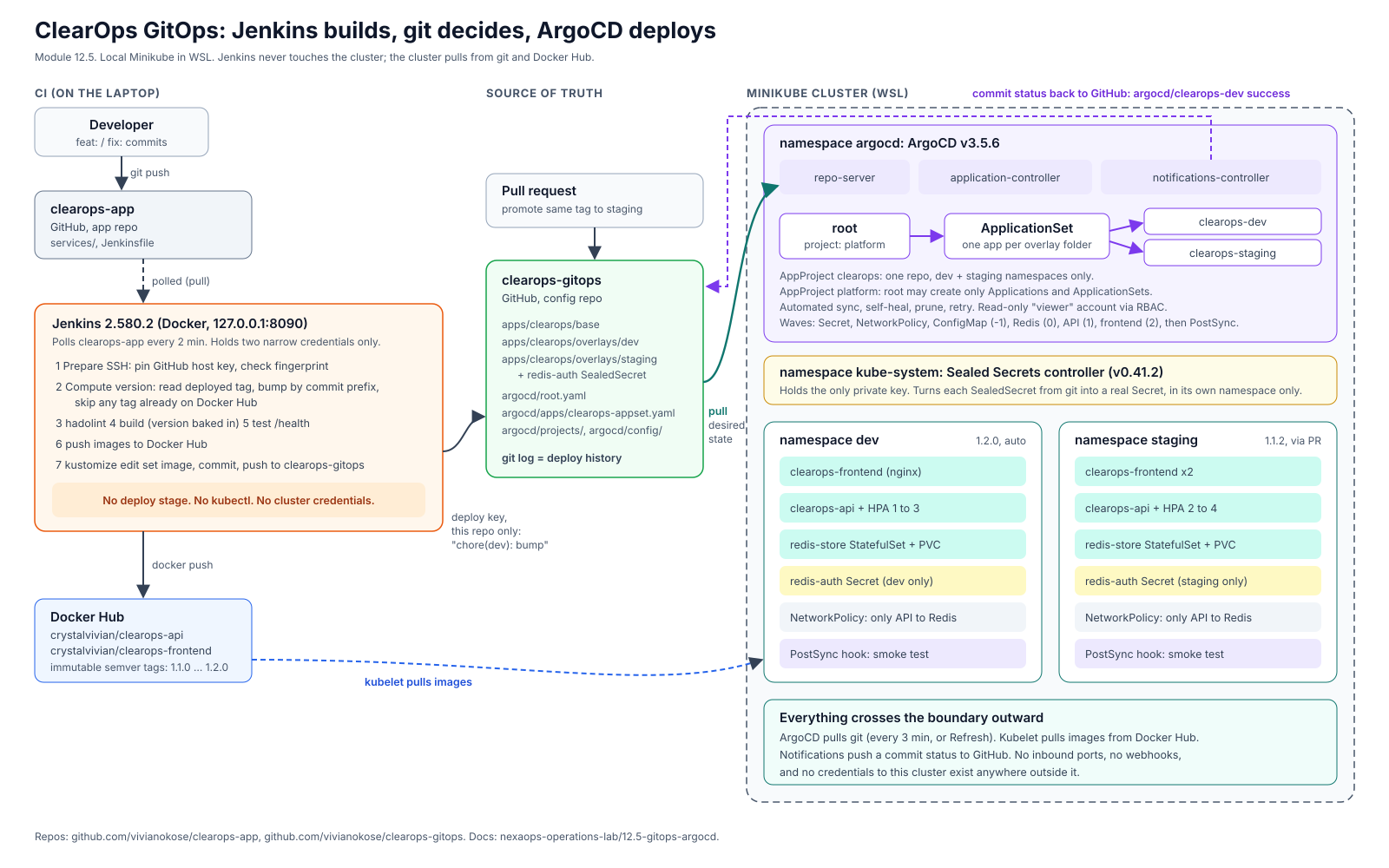
Jenkins Builds, Git Decides, ArgoCD Deploys: GitOps With a Real Rollback
My Jenkins pipeline used to log into my server and deploy. This week I took that power away from it completely, and the deploys got safer, more honest and easier to undo.
This is the write-up of that change: what GitOps is, how I built it on my laptop, and the parts that went wrong along the way, including a bad release I rolled back for real and a token I leaked on my own screen.
The problem with my old pipeline
A few modules ago I built a Jenkins pipeline that deployed my app by logging into the server over SSH and running docker run. It worked. It also meant Jenkins held the keys to production.
That is the uncomfortable part of a push-based pipeline. Whoever controls the CI server controls production. Jenkins is usually exposed to the internet for webhooks, it is full of plugins, and it collects credentials over time. If it gets compromised, so does everything it can deploy to.
There is a second problem. A push pipeline only acts at deploy time. If someone changes the server by hand an hour later, nothing notices until the next deploy quietly overwrites it.
GitOps fixes both.
GitOps in plain words
GitOps is one rule enforced by software: git is the only source of truth for what runs in the cluster.
You never change the cluster directly. You change git, and an agent inside the cluster makes the cluster match. The agent keeps checking, forever, so manual changes get noticed and undone.
The direction flips. Instead of CI reaching into the cluster (push), the cluster reaches out to git (pull). The CI server no longer needs any access to the cluster at all.
Here is what I built:
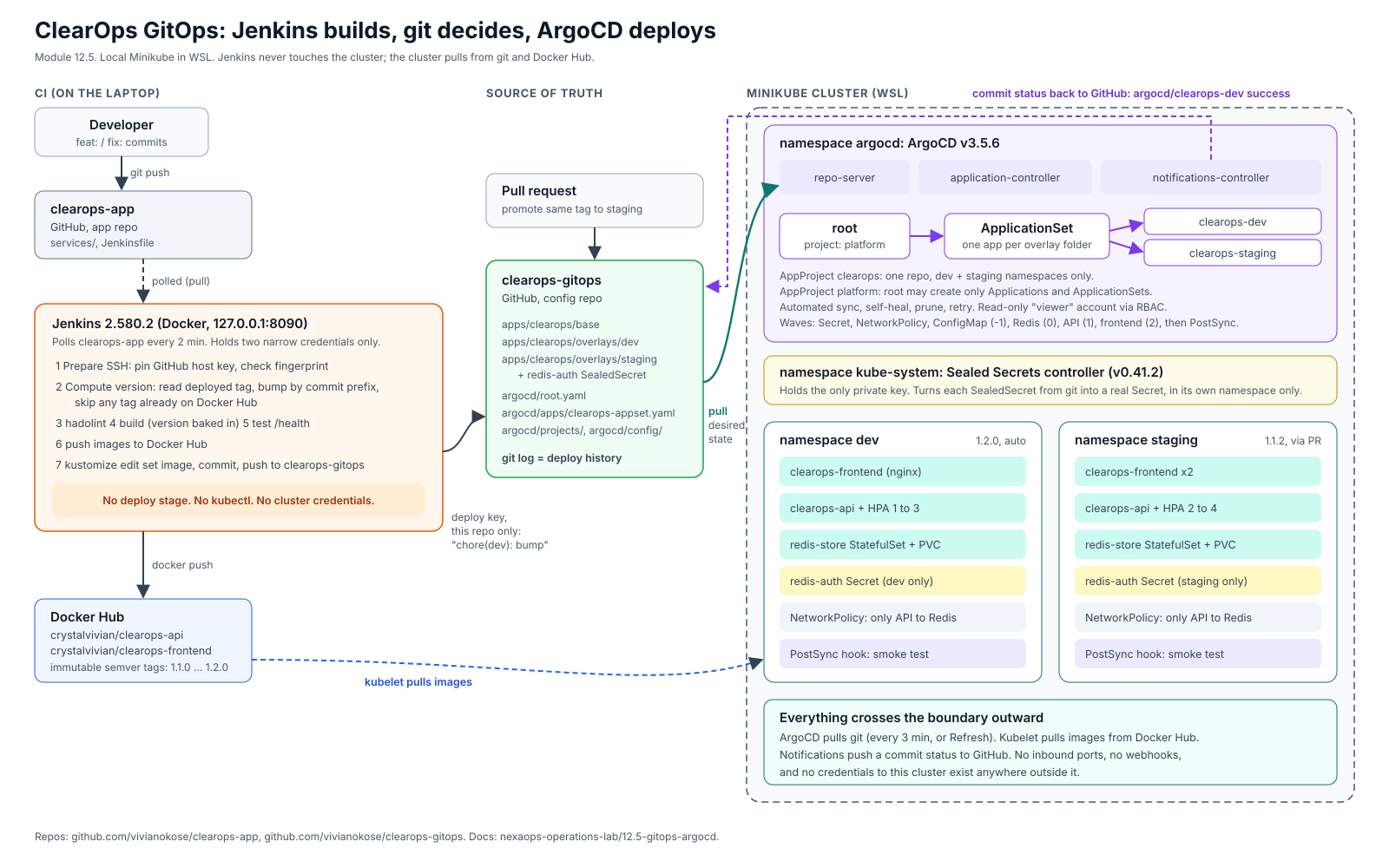
Every arrow crosses the cluster boundary outward. No inbound ports, and no cluster credentials anywhere outside the cluster.
The setup
Everything ran on a local Minikube cluster in WSL, so there was no cloud bill.
- clearops-app: the app repo. Code, Dockerfiles, Jenkinsfile.
- clearops-gitops: the config repo. Kubernetes manifests for dev and staging. Its
git logis the deploy history. - ArgoCD v3.5.6 inside the cluster, watching the config repo.
- Jenkins in a Docker container on my laptop, bound to localhost.
The app is ClearOps, a small three-tier app (frontend, API, Redis) from my Kubernetes module. Moving it into the config repo exposed a bug I had shipped back then: my Redis NetworkPolicy still pointed at an old Redis Deployment I had replaced, so it protected nothing. Nothing broke, which is exactly how that kind of bug hides.
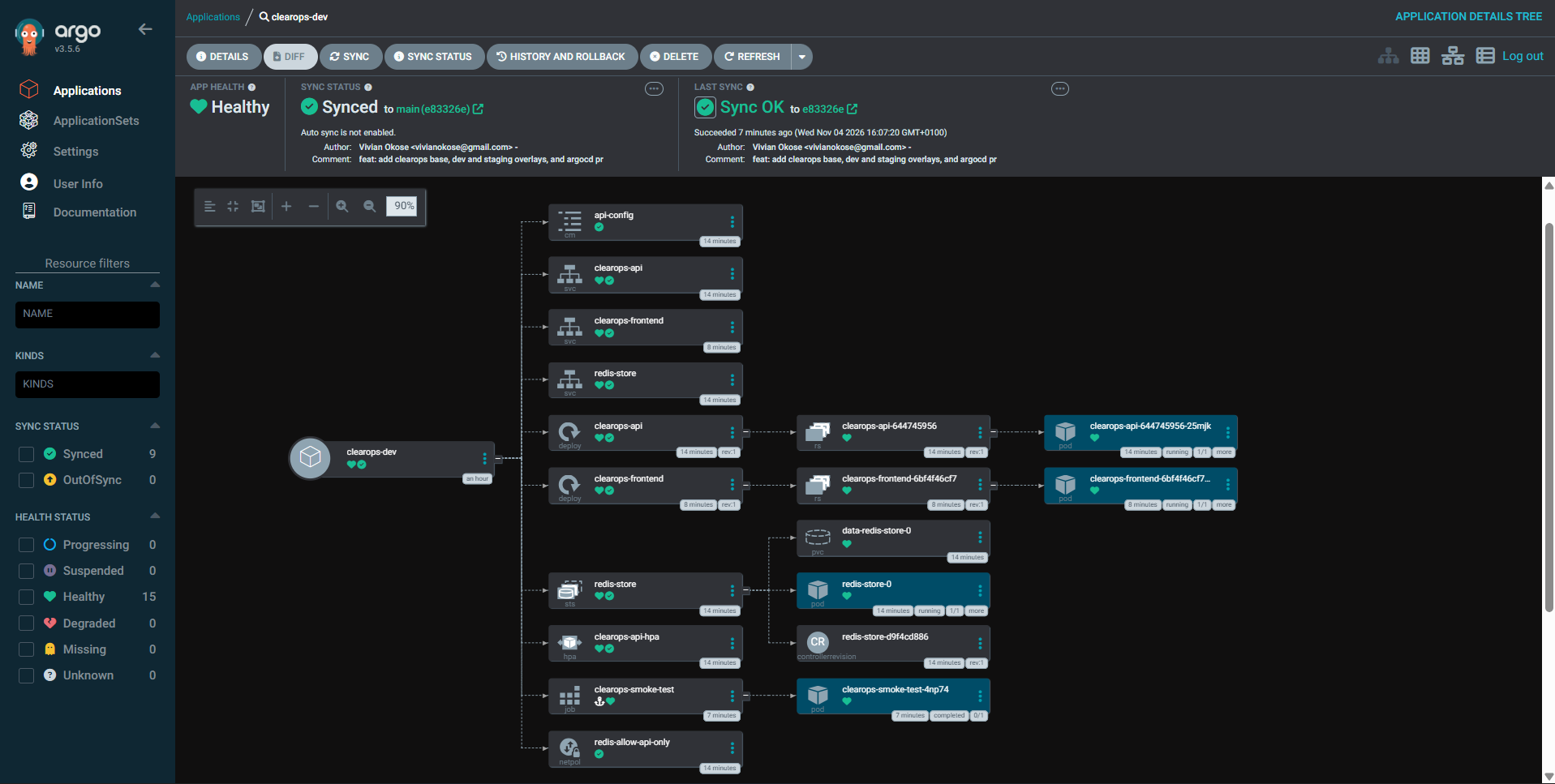
The dev environment as ArgoCD sees it: everything defined in git, Synced and Healthy.
The first sync failed, by the way. My sync waves deploy in order (config, then Redis, then the API, then the frontend), and ArgoCD waits for each wave to be healthy before starting the next. The API's autoscaler was in the same wave as the API, and a pod that is seconds old has no CPU metrics yet, so the autoscaler reported itself as Degraded. ArgoCD stopped there. The frontend never deployed and the smoke test never ran. A retry policy fixed it for good.
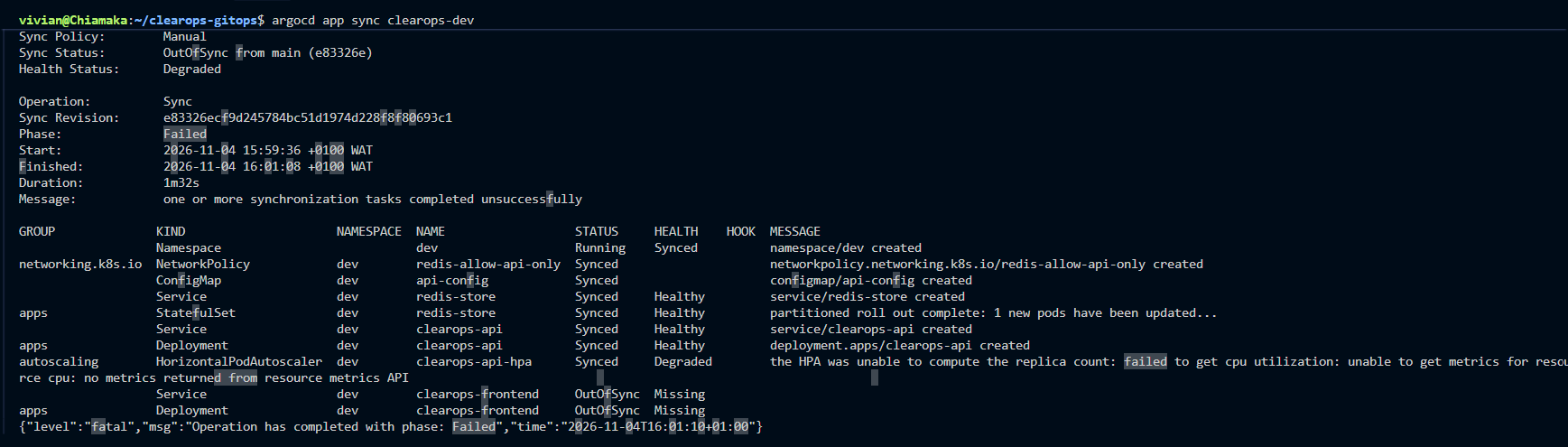
The waves worked exactly as designed. They just stopped where they were told to stop.
Watching drift die
To test the "keeps checking forever" part, I played the on-call engineer and changed a config value by hand. Then I switched on ArgoCD's three sync settings one at a time:
| Policy | What happened to my manual change |
|---|---|
| Manual | Detected and shown as a diff. Left alone. |
| Automated | Still left alone. Automated reacts to new commits, not to the cluster. |
| Automated + self-heal | Reverted in about 2 seconds. |
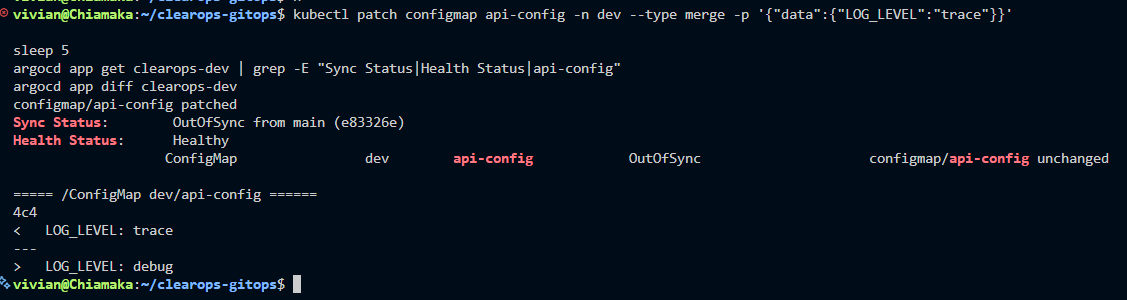
Git says debug. The cluster says trace. ArgoCD noticed within seconds.
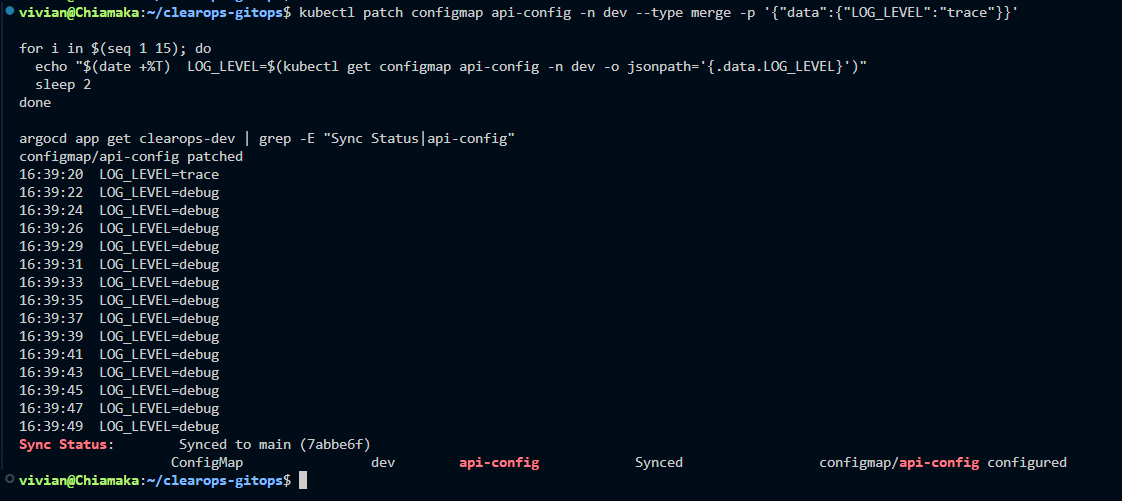
trace at 16:39:20, debug again at 16:39:22. Nobody touched anything.
I also learned something I had not expected. The commit that switched automated sync on was itself a new commit, so ArgoCD re-applied everything and quietly overwrote my manual change. Any commit to the watched branch does that, even one about something unrelated. That is exactly how an undocumented hotfix disappears two weeks later.
A pipeline that stops at a commit
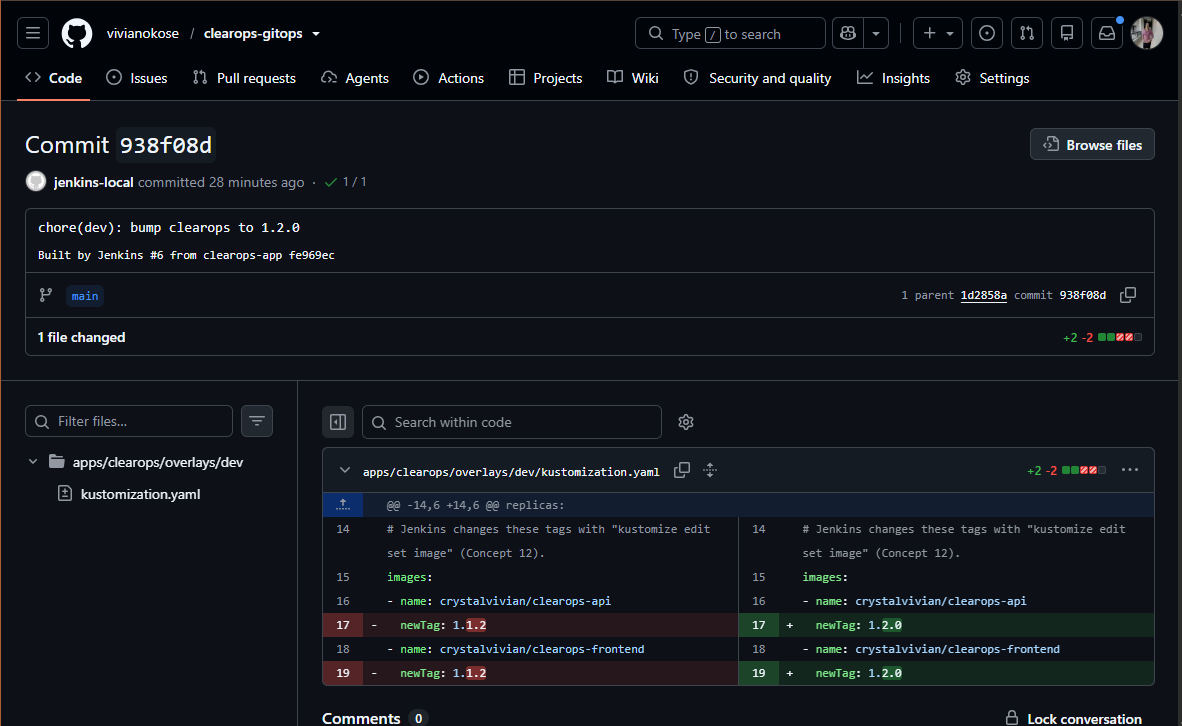
The Jenkins pipeline builds, tests and pushes the images, then writes the new image tag into the config repo and stops. There is no deploy stage. ArgoCD sees the commit and deploys it.
| Stage | What it does |
|---|---|
| Prepare SSH | Pins GitHub's host key and checks its fingerprint |
| Compute version | Reads the deployed version from the config repo, bumps it by commit prefix (feat or fix) |
| Lint, build, test | hadolint, build with the version baked in, check /health reports that version |
| Push | Docker Hub token passed safely through stdin |
| Update GitOps repo | kustomize edit set image, commit, push with a deploy key for that one repo |
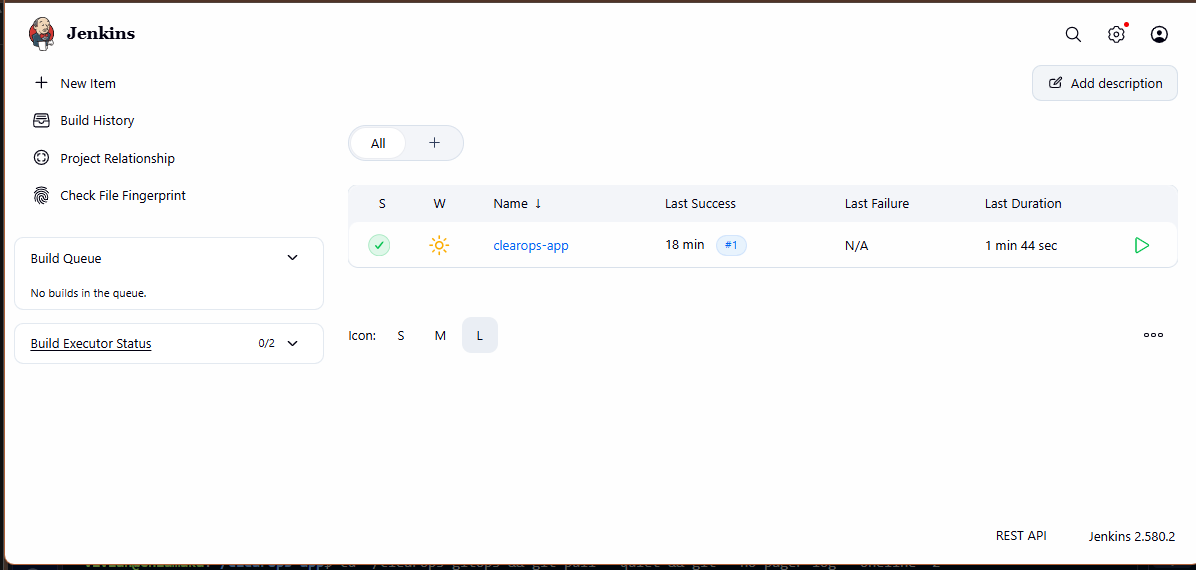
The gap where the deploy stage used to be is the point.
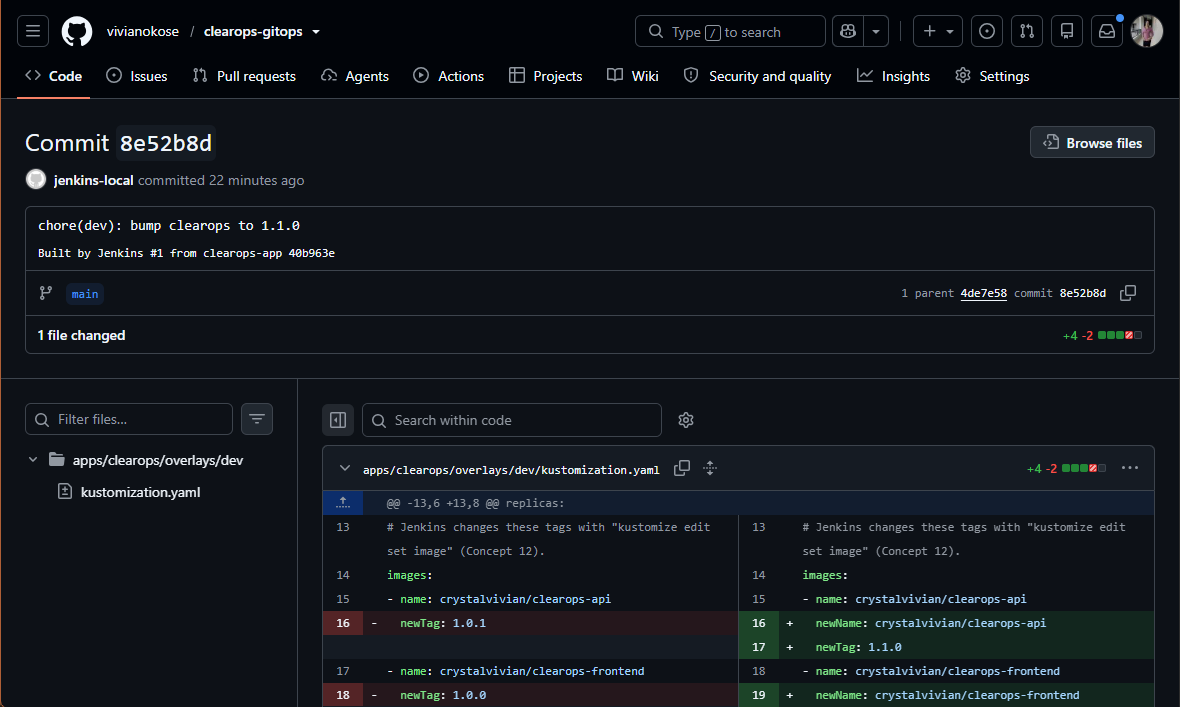
The deploy is a git commit, with an author and a timestamp.
Jenkins holds exactly two credentials: a Docker Hub token and a deploy key that can push to one repo. If Jenkins were compromised, the worst an attacker could do is push a commit, which is visible, reviewable and revertible.
My second build failed with the image tag ..1. My version stage read the deployed version from the line after the image name in a Kustomize file, but Kustomize had inserted an extra line there, so the version came back empty. Empty plus a patch bump gave ..1, and Docker refused it. The fix was to read the version from the rendered output instead, and to stop loudly if the value is not x.y.z. The real lesson: the empty value travelled two stages before anything complained.
A real bad release
Then I shipped a realistic bug. Version 1.1.1 made a record count "configurable" but never set the config, so the data endpoint returned 0 records instead of 42. The health checks passed. Everything was green. The app was wrong.
In GitOps, a rollback is a change to git. I reverted Jenkins' bump commit in the config repo, and ArgoCD put 1.1.0 back within a minute.
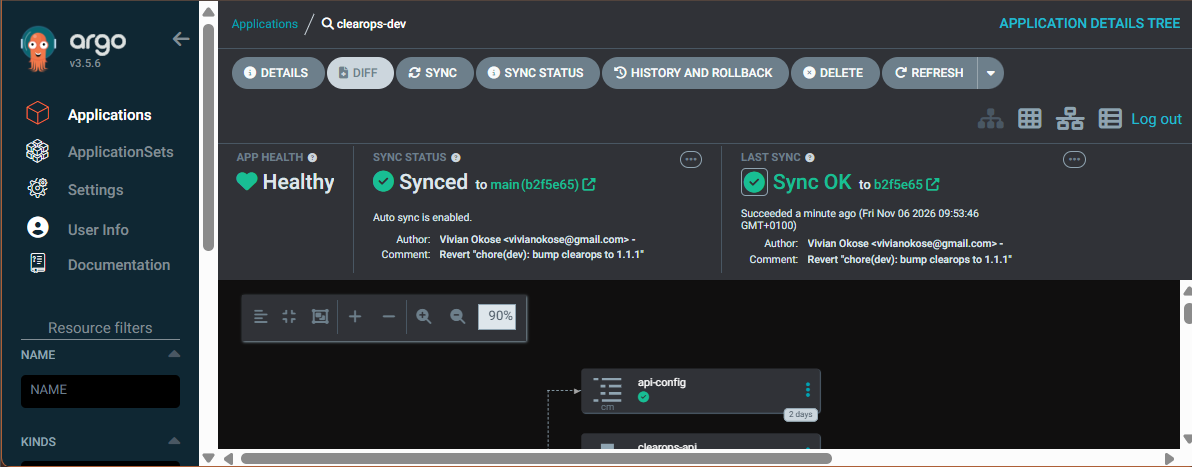
The release, the revert, who did each, and when. Nothing erased.
Then I almost walked into a trap. With 1.1.0 deployed again, the next fix would have been numbered 1.1.1 again. That would have overwritten the bad image on Docker Hub under the same tag, and worse, the cluster still had the buggy 1.1.1 cached. The fix would have deployed the old bug, with everything showing green.
So the pipeline now asks Docker Hub whether a tag already exists, and skips it if so. The real fix shipped as 1.1.2.
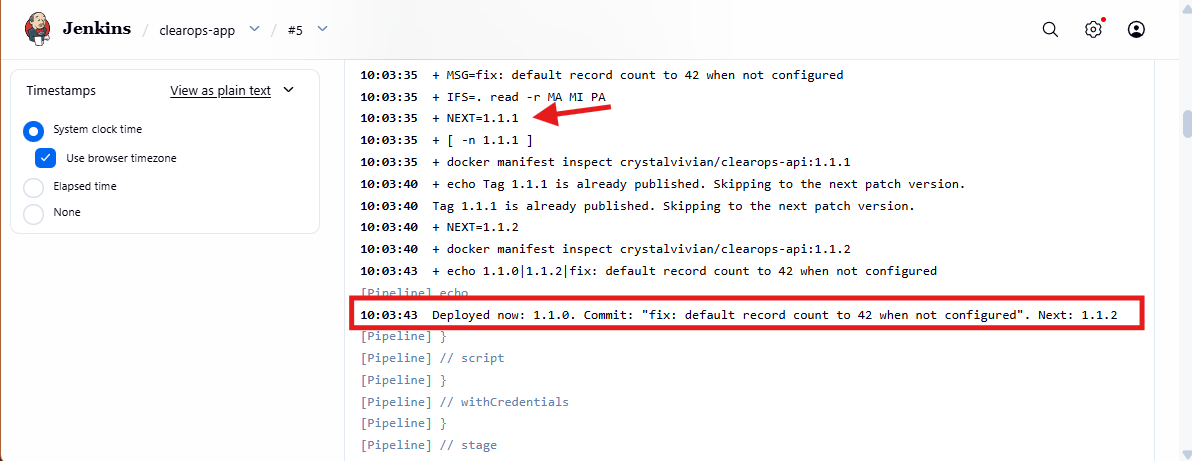
"Tag 1.1.1 is already published. Skipping to the next patch version."
Swapping the manager with zero restarts
Next I moved from one Application per environment to an App of Apps root, and then to an ApplicationSet that creates one Application per environment folder. Adding an environment becomes "add a folder."
The handover meant releasing the old Applications without deleting what they managed, then letting the ApplicationSet adopt the running workloads. Every pod's start time was identical before and after. Not one restart.
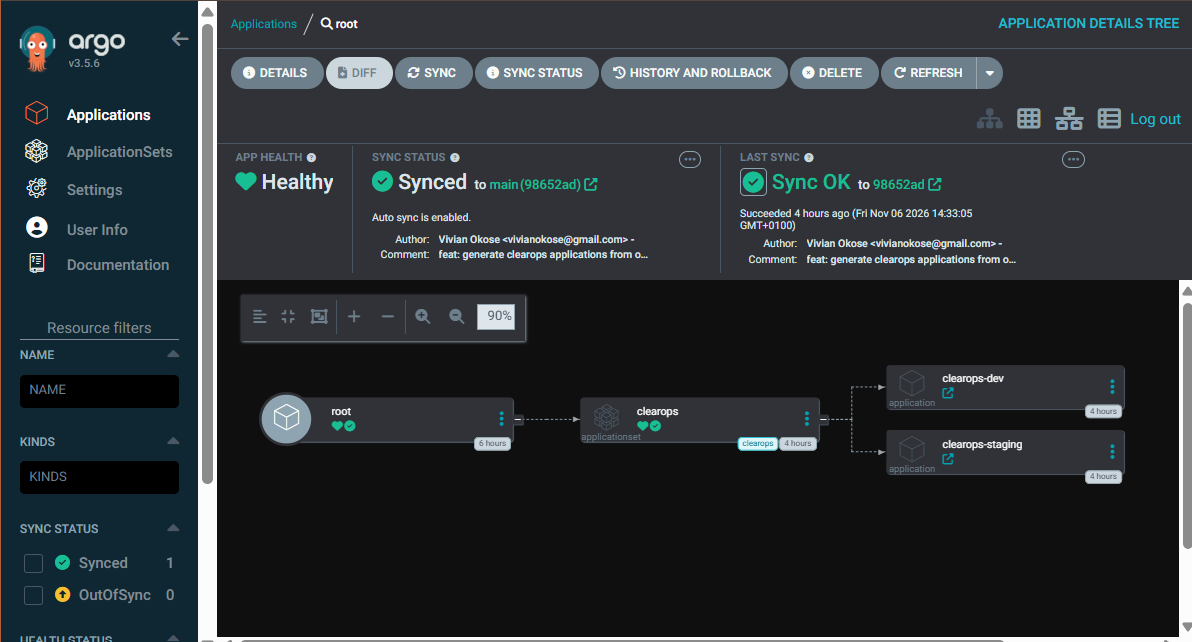
One template, one Application per overlay folder.
I did make one mistake. I removed the old files in one commit and planned to add the new one in the next, which left a folder empty for one commit. Git does not keep empty folders, so ArgoCD found its path missing. It refused to act instead of concluding "nothing should exist, delete everything." That refusal is a safety feature I was glad to meet in a lab rather than in production.
Secrets in a public repo
My config repo is public, and Redis needed a password. A Kubernetes Secret is only base64, which anyone can decode, so it cannot go in git.
I used Sealed Secrets. A controller in the cluster holds a private key. On my laptop, kubeseal encrypts the secret with the matching public key, and only the controller can decrypt it. The password was generated, sealed and committed in one pipe, and never printed or saved anywhere. A secret sealed for dev cannot be decrypted in staging, which I tested.
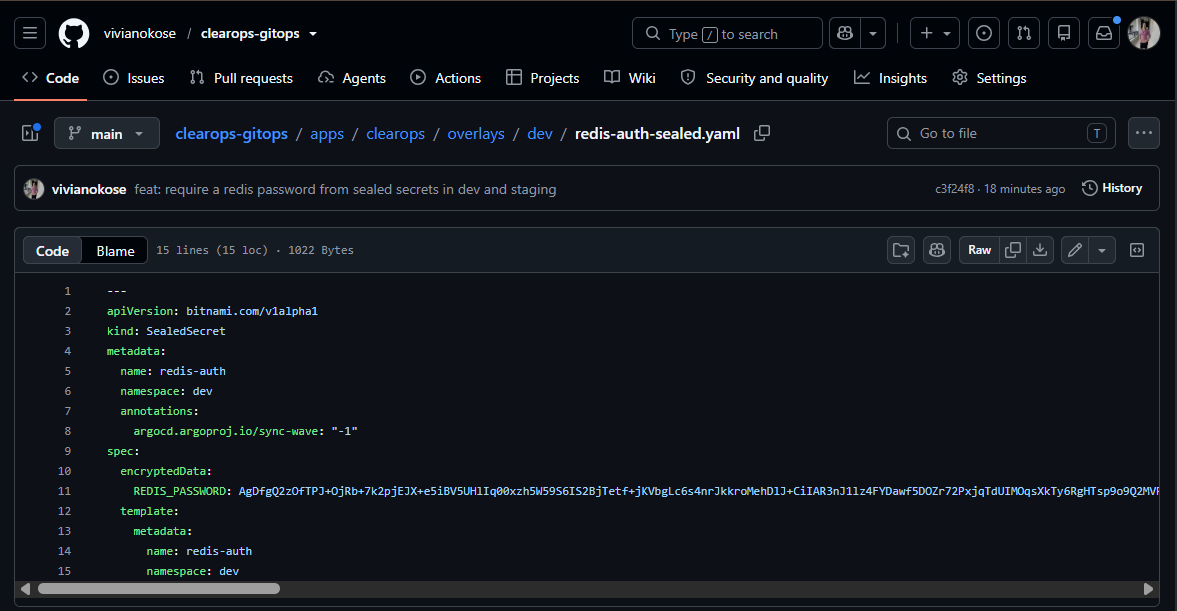
Anyone can read my repo. Nobody can read my password.
Finally, ArgoCD now writes the result of every deploy back onto the commit in GitHub. A green tick means that commit is actually running.
argocd/clearops-dev: Synced and healthy in dev.
The honest mistakes
Two slips are worth sharing, because both are common.
While setting up the GitHub token for those commit statuses, I pasted the token where the prompt text belonged, so my terminal printed it. I revoked it straight away, scrubbed it from shell history and made a new one. The damage was limited because the token could only set commit statuses on one repo. Least privilege is not abstract when it is the reason a mistake stays small.
Later, a wildcard copy pushed 50 extra screenshots into my public repo. None held a live secret, but it taught me something: secret scanners read text. They cannot see a password inside an image.
What I would change in production
- Separate build agents or a daemonless builder instead of Jenkins using the host's Docker socket.
- The Sealed Secrets controller managed by ArgoCD too, under a tightly scoped project.
- Production on its own cluster, with its own gated promotion.
- Webhooks instead of polling, which needs a public endpoint my laptop does not have.
What I took away
- Synced is not the same as working. ArgoCD guarantees the cluster matches git, not that git is right.
- Rollback is a git operation, and a version number must never be reused after one.
- Fail loudly at the first bad value, not three stages later.
- The safest credential is the one CI never has.
The full write-up, the rollback runbook with the incident timeline, and every screenshot are in the Module 12.5 folder of my portfolio repo.
About the author
- I build production-grade cloud infrastructure and agentic AI pipelines on AWS. With a background in biochemistry and biotechnology, I bring scientific precision to the systems I design. Every pipeline I build has deliberate safety guardrails -- minimal permissions, read-only auditors, plan-before-apply gates. Safety is architecture, not discipline. Currently writing a 7-part series documenting the Agentic Infrastructure project: a complete Claude Code pipeline from environment setup to live AWS deployment, SubAgents, MCP integration, and safety hooks. Portfolio: viviancloud.site
Comments
Join the discussionReally clear walkthrough — the part that stuck with me is that the bad 1.1.1 release passed its health checks while returning 0 records instead of 42, so “Synced and Healthy” really was not the same as working. Your fix for the version-reuse trap is a nice practical touch too: checking Docker Hub for an existing tag before bumping, instead of letting a reverted version get rebuilt. One question: now that ArgoCD writes commit statuses back to GitHub, have you considered adding a smoke test after a sync that actually exercises the record count, so a future bad-but-synced release gets caught before it reaches staging? The self-heal revert in about two seconds was also a great demo of the drift point.